Snowflake integration guide
Snowflake is a cloud data warehousing solution, where you as a partner can store your data and integrate with the EUID framework. Using Snowflake, EUID enables you to securely share consumer identifier data without exposing sensitive personal data. Even though you have the option to query the Operator Web Services directly for the consumer identifier data, the Snowflake EUID integration offers a more seamless experience.
This document is for those using the latest Snowflake marketplace listing. If you're using an earlier version, see Snowflake integration guide (pre-July 2025). If you're using the earlier implementation, we recommend that you migrate to the newer version to take advantage of the updates and enhancements: for details, see Changes from previous version. For migration information, see Migration guide.
Snowflake marketplace listing
The following listing for EUID is available on the Snowflake Marketplace:
For a summary of all integration options and steps for advertisers and data providers, see Advertiser/data provider integration overview.
Functionality
The following table summarizes the functionality available with the EUID Snowflake integration.
| Encrypt raw EUID to EUID token | Decrypt EUID token to raw EUID | Generate EUID token from personal data | Refresh EUID token | Map personal data to raw EUID |
|---|---|---|---|---|
| — | — | — | —* | ✅ |
*You cannot use Snowflake to generate an EUID token directly from personal data. However, you can convert personal data to a raw EUID, and then encrypt the raw EUID into an EUID token.
Changes from previous version
The July 2025 update to the EUID Snowflake Marketplace integration introduces a new identity mapping function that simplifies EUID refresh management and allows accessing previous raw EUIDs for 90 days after rotation.
These changes assume that your code integration uses the version of Snowflake functions published before July 2025: see Snowflake integration guide (pre-July 2025). For details on migrating to this version, see Migration guide.
The following table shows the differences between the old and new identity mapping functions.
| Function | Version | Return fields | Key differences | Comments |
|---|---|---|---|---|
FN_T_IDENTITY_MAP | Previous | UID, BUCKET_ID, UNMAPPED | Basic identity mapping with salt bucket tracking | Legacy function using salt bucket monitoring for refresh management. For details, see Snowflake integration guide (pre-July 2025). |
FN_T_IDENTITY_MAP_V3 | Current | UID, PREV_UID, REFRESH_FROM, UNMAPPED | Enhanced with previous EUID access and refresh timestamps | Returns previous EUID for 90 days after rotation and uses refresh timestamps instead of salt bucket monitoring. For details, see Map personal data. |
Key benefits
This update provides two major benefits:
- Simplified Refresh Management: You can monitor for EUIDs reaching
REFRESH_FROMtimestamps instead of polling salt buckets for rotation. - Previous EUID Access: You have access to previous raw EUIDs for 90 days after rotation for campaign measurement.
Workflow diagram
The following diagram and table illustrate the different parts of the EUID integration process in Snowflake, and the workflow.
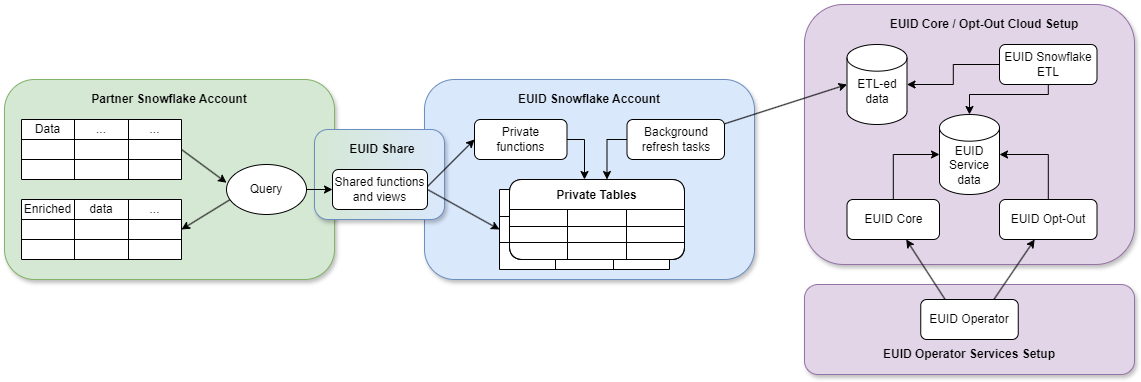
| Partner Snowflake account | EUID Snowflake account | EUID core opt-out cloud setup |
|---|---|---|
| As a partner, you set up a Snowflake account to host your data and engage in EUID integration by consuming functions and views through the EUID Share. | EUID integration, hosted in a Snowflake account, grants you access to authorized functions and views that draw data from private tables. You can't access the private tables. The EUID Share reveals only essential data needed for you to perform EUID-related tasks. NOTE: We store salts and encryption keys in the private tables. No personal data is stored at any point. | ETL (Extract Transform Load) jobs constantly update the EUID Core/Optout Snowflake storage with internal data that powers the EUID Operator Web Services. The data used by the Operator Web Services is also available through the EUID Share. |
| When you use shared functions and views, you pay Snowflake for transactional computation costs. | These private tables, secured in the EUID Snowflake account, automatically synchronize with the EUID Core/Optout Snowflake storage that holds internal data used to complete EUID-related tasks. |
Preparing personal data for processing
It's critical that the input data, which you are converting to EUID, is in an acceptable format. If it isn't, you won't get the expected results. For example, you must normalize phone numbers to include the country code, as explained in Phone number normalization.
For details, see Preparing emails and phone numbers for processing.
To validate the full token generation pipeline end to end, confirming that tokens generated from your normalized, hashed, and encoded values are correct, use the EUID Token Validator.
Summary of integration steps
To be able to request data, you must use the ACCOUNTADMIN role or another role with the CREATE DATABASE and IMPORT SHARE privileges in your Snowflake account.
The following list summarizes the integration steps for EUID mapping in Snowflake in the production environment:
If you want to try out an integration before using the production environment, see Testing in the integ environment.
-
Make sure that the EUID POC paperwork is signed with your EUID contact. If you're not sure who to ask, see Contact info.
-
Request access to the EUID share:
-
Request access through the Snowflake marketplace listing. In your request, include your Snowflake account number and the region.
-
Let your EUID contact know that you've requested access.
-
-
Your EUID contact arranges for your Snowflake account to be provisioned with access to the EUID mapping share.
If you did any initial testing (see Testing in the integ environment), be sure to update the functions to reflect the production EUID share, along with your own relevant table names.
Testing in the integ environment
If you'd like to test the mapping share before signing an EUID POC, you can ask your EUID contact for access to the Snowflake share in the integ (integration) environment. This environment is for testing only, and has no production data. In the request, be sure to include your account number and region.
In this scenario, the following steps occur:
-
Your EUID contact provisions the share listing in the Snowflake Private Marketplace, and lets you know when this step is complete.
-
You can then view the Private Marketplace listing and request access to the integ share.
-
When you've requested access, your EUID contact provisions the integ share to your account.
Shared objects
You can map personal data to EUIDs by using the following function:
FN_T_IDENTITY_MAP_V3(for details, see Map personal data)
The following function is deprecated in favor of FN_T_IDENTITY_MAP_V3. You can still use it if you are on the previous Snowflake version (see Snowflake integration guide (pre-July 2025)), but we recommend upgrading as soon as possible:
FN_T_IDENTITY_MAP(deprecated)
If you are using the deprecated function, and need help migrating to the newer function, see Migration guide.
To identify the EUIDs that you must regenerate, monitor the REFRESH_FROM timestamps returned by the FN_T_IDENTITY_MAP_V3 function. For details, see Monitor raw EUID refresh and regenerate raw EUIDs.
Database and schema names
The following sections include query examples for each solution, which are identical except for the database and schema name variables:
{DATABASE_NAME}.{SCHEMA_NAME}
For example:
select UID, PREV_UID, REFRESH_FROM, UNMAPPED from table({DATABASE_NAME}.{SCHEMA_NAME}.FN_T_IDENTITY_MAP_V3('validate@example.com', 'email'));
All query examples use the following default values for each name variable:
| Variable | Default value | Comments |
|---|---|---|
{DATABASE_NAME} | EUID_PROD_UID_SH | If needed, you can change the default database name when creating a new database after you are granted access to the selected EUID Share. |
{SCHEMA_NAME} | UID | This is an immutable name. |
Map personal data
To map all types of personal data, use the FN_T_IDENTITY_MAP_V3 function.
If the personal data is an email address, the service normalizes the data using the EUID Email address normalization rules.
If the personal data is a phone number, you must normalize it before sending it to the service, using the EUID Phone number normalization rules.
| Argument | Data type | Description |
|---|---|---|
INPUT | varchar(256) | The personal data to map to the EUID, refresh timestamp and previous EUID for 90 days after rotation. |
INPUT_TYPE | varchar(256) | The type of personal data to map. Allowed values: email, email_hash, phone, and phone_hash. |
A successful query returns the following information for the specified personal data.
| Column name | Data type | Description |
|---|---|---|
UID | TEXT | The value is one of the following:
|
PREV_UID | TEXT | The value is one of the following:
|
REFRESH_FROM | NUMBER | The value is one of the following:
|
UNMAPPED | TEXT | The value is one of the following:
|
Values for the UNMAPPED column
The following table shows possible values for the UNMAPPED column.
| Value | Meaning |
|---|---|
NULL | The personal data was successfully mapped. |
OPTOUT | The user has opted out. |
INVALID IDENTIFIER | The email address or phone number is invalid. |
INVALID INPUT TYPE | The value of INPUT_TYPE is invalid. Valid values for INPUT_TYPE are: email, email_hash, phone, phone_hash. |
Examples
Mapping request examples in this section:
- Single unhashed email
- Multiple unhashed emails
- Single unhashed phone number
- Multiple unhashed phone numbers
- Single hashed email
- Multiple hashed emails
- Single hashed phone number
- Multiple hashed phone numbers
The input and output data in these examples is fictitious, for illustrative purposes only. The values provided are not real values.
Mapping request example - single unhashed email
The following query illustrates how to map a single email address, using the default database and schema names.
select UID, PREV_UID, REFRESH_FROM, UNMAPPED from table(EUID_PROD_UID_SH.UID.FN_T_IDENTITY_MAP_V3('validate@example.com', 'email'));
Query results for a single email:
+----------------------------------------------+--------------------------------------------------+--------------+----------+
| UID                                          | PREV_UID                                         | REFRESH_FROM | UNMAPPED |
+----------------------------------------------+--------------------------------------------------+--------------+----------+
| 2ODl112/VS3x2vL+kG1439nPb7XNngLvOWiZGaMhdcU= | vP9zK2mL7fR4tY8qN3wE6xB0dH5jA1sC+nI/oGuMeVa=     | 1735689600   | NULL     |
+----------------------------------------------+--------------------------------------------------+--------------+----------+
Mapping request example - multiple unhashed emails
The following query illustrates how to map multiple email addresses, using the default database and schema names.
select a.ID, a.EMAIL, m.UID, m.PREV_UID, m.REFRESH_FROM, m.UNMAPPED from AUDIENCE a LEFT JOIN(
    select ID, t.* from AUDIENCE, lateral EUID_PROD_UID_SH.UID.FN_T_IDENTITY_MAP_V3(EMAIL, 'email') t) m
    on a.ID=m.ID;
Query results for multiple emails:
The following table identifies each item in the response, including NULL values for NULL or improperly formatted emails.
+----+----------------------+----------------------------------------------+----------------------------------------------+--------------+--------------------+
| ID | EMAIL                | UID                                          | PREV_UID                                     | REFRESH_FROM | UNMAPPED           |
+----+----------------------+----------------------------------------------+----------------------------------------------+--------------+--------------------+
|  1 | validate@example.com | 2ODl112/VS3x2vL+kG1439nPb7XNngLvOWiZGaMhdcU= | vP9zK2mL7fR4tY8qN3wE6xB0dH5jA1sC+nI/oGuMeVa= | 1735689600   | NULL               |
|  2 | test@uidapi.com      | IbW4n6LIvtDj/8fCESlU0QG9K/fH63UdcTkJpAG8fIQ= | NULL                                         | 1735689600   | NULL               |
|  3 | optout@example.com   | NULL                                         | NULL                                         | NULL         | OPTOUT             |
|  4 | invalid-email        | NULL                                         | NULL                                         | NULL         | INVALID IDENTIFIER |
|  5 | NULL                 | NULL                                         | NULL                                         | NULL         | INVALID IDENTIFIER |
+----+----------------------+----------------------------------------------+----------------------------------------------+--------------+--------------------+
Mapping request example - single unhashed phone number
The following query illustrates how to map a phone number, using the default database and schema names.
You must normalize phone numbers using the EUID Phone number normalization rules.
select UID, PREV_UID, REFRESH_FROM, UNMAPPED from table(EUID_PROD_UID_SH.UID.FN_T_IDENTITY_MAP_V3('+12345678901', 'phone'));
Query results for a single phone number:
+----------------------------------------------+----------+--------------+----------+
| UID                                          | PREV_UID | REFRESH_FROM | UNMAPPED |
+----------------------------------------------+----------+--------------+----------+
| 2ODl112/VS3x2vL+kG1439nPb7XNngLvOWiZGaMhdcU= | NULL     | 1735689600   | NULL     |
+----------------------------------------------+----------+--------------+----------+
Mapping request example - multiple unhashed phone numbers
The following query illustrates how to map multiple phone numbers, using the default database and schema names.
You must normalize phone numbers using the EUID Phone number normalization rules.
select a.ID, a.PHONE, m.UID, m.PREV_UID, m.REFRESH_FROM, m.UNMAPPED from AUDIENCE a LEFT JOIN(
    select ID, t.* from AUDIENCE, lateral EUID_PROD_UID_SH.UID.FN_T_IDENTITY_MAP_V3(PHONE, 'phone') t) m
    on a.ID=m.ID;
Query results for multiple phone numbers:
The following table identifies each item in the response, including NULL values for NULL or invalid phone numbers.
+----+--------------+----------------------------------------------+----------------------------------------------+--------------+--------------------+
| ID | PHONE        | UID                                          | PREV_UID                                     | REFRESH_FROM | UNMAPPED           |
+----+--------------+----------------------------------------------+----------------------------------------------+--------------+--------------------+
|  1 | +12345678901 | 2ODl112/VS3x2vL+kG1439nPb7XNngLvOWiZGaMhdcU= | vP9zK2mL7fR4tY8qN3wE6xB0dH5jA1sC+nI/oGuMeVa= | 1735689600   | NULL               |
|  2 | +61491570006 | IbW4n6LIvtDj/8fCESlU0QG9K/fH63UdcTkJpAG8fIQ= | NULL                                         | 1735689600   | NULL               |
|  3 | +56789123001 | NULL                                         | NULL                                         | NULL         | OPTOUT             |
|  4 | 1234         | NULL                                         | NULL                                         | NULL         | INVALID IDENTIFIER |
|  5 | NULL         | NULL                                         | NULL                                         | NULL         | INVALID IDENTIFIER |
+----+--------------+----------------------------------------------+----------------------------------------------+--------------+--------------------+
Mapping request example - single hashed email
The following query illustrates how to map a single email address hash, using the default database and schema names.
select UID, PREV_UID, REFRESH_FROM, UNMAPPED from table(EUID_PROD_UID_SH.UID.FN_T_IDENTITY_MAP_V3(BASE64_ENCODE(SHA2_BINARY('validate@example.com', 256)), 'email_hash'));
Query results for a single hashed email:
+----------------------------------------------+----------------------------------------------+--------------+----------+
| UID                                          | PREV_UID                                     | REFRESH_FROM | UNMAPPED |
+----------------------------------------------+----------------------------------------------+--------------+----------+
| 2ODl112/VS3x2vL+kG1439nPb7XNngLvOWiZGaMhdcU= | vP9zK2mL7fR4tY8qN3wE6xB0dH5jA1sC+nI/oGuMeVa= | 1735689600   | NULL     |
+----------------------------------------------+----------------------------------------------+--------------+----------+
Mapping request example - multiple hashed emails
The following query illustrates how to map multiple email address hashes, using the default database and schema names.
select a.ID, a.EMAIL_HASH, m.UID, m.PREV_UID, m.REFRESH_FROM, m.UNMAPPED from AUDIENCE a LEFT JOIN(
    select ID, t.* from AUDIENCE, lateral EUID_PROD_UID_SH.UID.FN_T_IDENTITY_MAP_V3(EMAIL_HASH, 'email_hash') t) m
    on a.ID=m.ID;
Query results for multiple hashed emails:
The following table identifies each item in the response, including NULL values for NULL hashes.
+----+----------------------------------------------+----------------------------------------------+----------------------------------------------+--------------+--------------------+
| ID | EMAIL_HASH                                   | UID                                          | PREV_UID                                     | REFRESH_FROM | UNMAPPED           |
+----+----------------------------------------------+----------------------------------------------+----------------------------------------------+--------------+--------------------+
|  1 | LdhtUlMQ58ZZy5YUqGPRQw5xUMS5dXG5ocJHYJHbAKI= | 2ODl112/VS3x2vL+kG1439nPb7XNngLvOWiZGaMhdcU= | vP9zK2mL7fR4tY8qN3wE6xB0dH5jA1sC+nI/oGuMeVa= | 1735689600   | NULL               |
|  2 | /XJSTajB68SCUyuc3ePyxSLNhxrMKvJcjndq8TuwW5g= | IbW4n6LIvtDj/8fCESlU0QG9K/fH63UdcTkJpAG8fIQ= | NULL                                         | 1735689600   | NULL               |
|  2 | UebesrNN0bQkm/QR7Jx7eav+UDXN5Gbq3zs1fLBMRy0= | NULL                                         | NULL                                         | 1735689600   | OPTOUT             |
|  4 | NULL                                         | NULL                                         | NULL                                         | NULL         | INVALID IDENTIFIER |
+----+----------------------------------------------+----------------------------------------------+----------------------------------------------+--------------+--------------------+
Mapping request example - single hashed phone number
The following query illustrates how to map a single phone number hash, using the default database and schema names.
select UID, PREV_UID, REFRESH_FROM, UNMAPPED from table(EUID_PROD_UID_SH.UID.FN_T_IDENTITY_MAP_V3(BASE64_ENCODE(SHA2_BINARY('+12345678901', 256)), 'phone_hash'));
Query results for a single hashed phone number:
+----------------------------------------------+----------------------------------------------+--------------+----------+
| UID                                          | PREV_UID                                     | REFRESH_FROM | UNMAPPED |
+----------------------------------------------+----------------------------------------------+--------------+----------+
| 2ODl112/VS3x2vL+kG1439nPb7XNngLvOWiZGaMhdcU= | vP9zK2mL7fR4tY8qN3wE6xB0dH5jA1sC+nI/oGuMeVa= | 1735689600   | NULL     |
+----------------------------------------------+----------------------------------------------+--------------+----------+
Mapping request example - multiple hashed phone numbers
The following query illustrates how to map multiple phone number hashes, using the default database and schema names.
select a.ID, a.PHONE_HASH, m.UID, m.PREV_UID, m.REFRESH_FROM, m.UNMAPPED from AUDIENCE a LEFT JOIN(
    select ID, t.* from AUDIENCE, lateral EUID_PROD_UID_SH.UID.FN_T_IDENTITY_MAP_V3(PHONE_HASH, 'phone_hash') t) m
    on a.ID=m.ID;
Query results for multiple hashed phone numbers:
The following table identifies each item in the response, including NULL values for NULL hashes.
+----+----------------------------------------------+----------------------------------------------+----------------------------------------------+--------------+--------------------+
| ID | PHONE_HASH                                   | UID                                          | PREV_UID                                     | REFRESH_FROM | UNMAPPED           |
+----+----------------------------------------------+----------------------------------------------+----------------------------------------------+--------------+--------------------+
|  1 | LdhtUlMQ58ZZy5YUqGPRQw5xUMS5dXG5ocJHYJHbAKI= | 2ODl112/VS3x2vL+kG1439nPb7XNngLvOWiZGaMhdcU= | vP9zK2mL7fR4tY8qN3wE6xB0dH5jA1sC+nI/oGuMeVa= | 1735689600   | NULL               |
|  2 | /XJSTajB68SCUyuc3ePyxSLNhxrMKvJcjndq8TuwW5g= | IbW4n6LIvtDj/8fCESlU0QG9K/fH63UdcTkJpAG8fIQ= | NULL                                         | 1735689600   | NULL               |
|  2 | UebesrNN0bQkm/QR7Jx7eav+UDXN5Gbq3zs1fLBMRy0= | NULL                                         | NULL                                         | 1735689600   | OPTOUT             |
|  4 | NULL                                         | NULL                                         | NULL                                         | NULL         | INVALID IDENTIFIER |
+----+----------------------------------------------+----------------------------------------------+----------------------------------------------+--------------+--------------------+
Monitor raw EUID refresh and regenerate raw EUIDs
The FN_T_IDENTITY_MAP_V3 function returns refresh timestamps (REFRESH_FROM) that indicate when each EUID should be refreshed.
The raw EUID does not change before the refresh timestamp. After the refresh timestamp, remapping the personal data returns a new refresh timestamp, but the raw EUID might or might not change. It is possible for the raw EUID to remain unchanged for multiple refresh intervals.
To determine which EUIDs need regeneration, compare the current time to the REFRESH_FROM timestamps returned by the function.
| Column name | Data type | Description |
|---|---|---|
UID | TEXT | The EUID associated with the personal data. This is the current EUID value returned by the identity mapping function. |
REFRESH_FROM | NUMBER | The timestamp (in epoch seconds) indicating when this EUID should be refreshed. Compare this value to the current time to determine if regeneration is needed. |
The following example shows an input table and the query used to find the EUIDs in the table that must be regenerated because their refresh time has been reached.
Targeted input table
In this example scenario, the advertiser/data provider has stored the EUIDs in a table named AUDIENCE_WITH_EUID. The REFRESH_FROM column contains the timestamp when each EUID should be refreshed. If no EUID has been generated, the value is NULL, as shown in the third example. The advertiser/data provider can compare these timestamps to the current time to determine which EUIDs need to be regenerated.
select * from AUDIENCE_WITH_EUID;
+----+----------------------+----------------------------------------------+--------------+
| ID | EMAIL                | EUID                                         | REFRESH_FROM |
+----+----------------------+----------------------------------------------+--------------+
|  1 | validate@example.com | 2ODl112/VS3x2vL+kG1439nPb7XNngLvOWiZGaMhdcU= | 1735689600   |
|  2 | test1@uidapi.com     | Q4A5ZBuBCYfuV3Wd8Fdsx2+i33v7jyFcQbcMG/LH4eM= | 1735776000   |
|  3 | test2@uidapi.com     | NULL                                         | NULL         |
+----+----------------------+----------------------------------------------+--------------+
To find missing or outdated EUIDs, use the following query example.
select * from AUDIENCE_WITH_EUID
  where REFRESH_FROM <= DATE_PART(epoch_second, CURRENT_TIMESTAMP()) or EUID IS NULL;
Query results:
The following table identifies each item in the response. The result includes EUIDs that need to be refreshed because their REFRESH_FROM timestamp has passed, or EUIDs that are missing. ID 1 is returned because its refresh time (1735689600) is in the past (assuming current time is later). ID 2 is not returned because its refresh time hasn't been reached yet. ID 3 is returned due to a missing EUID.
+----+----------------------+----------------------------------------------+--------------+
| ID | EMAIL                | EUID                                         | REFRESH_FROM |
+----+----------------------+----------------------------------------------+--------------+
|  1 | validate@example.com | 2ODl112/VS3x2vL+kG1439nPb7XNngLvOWiZGaMhdcU= | 1735689600   |
|  3 | test2@uidapi.com     | NULL                                         | NULL         |
+----+----------------------+----------------------------------------------+--------------+
Migration guide
This section provides information to help you upgrade from the previous version to the new EUID Snowflake functionality with v3 functions.
Changing existing code
For a summary of changes, see Changes from previous version. The code snippets in this section are before/after examples of how the earlier functions might be implemented, and how you could update to use the new function. The key change is migrating from FN_T_IDENTITY_MAP to FN_T_IDENTITY_MAP_V3, which provides refresh timestamps instead of salt bucket IDs and includes previous EUID access.
Example for mapping unhashed emails
Before:
select UID, BUCKET_ID, UNMAPPED from table({DATABASE_NAME}.{SCHEMA_NAME}.FN_T_IDENTITY_MAP(EMAIL, 'email'));
After:
select UID, PREV_UID, REFRESH_FROM, UNMAPPED from table({DATABASE_NAME}.{SCHEMA_NAME}.FN_T_IDENTITY_MAP_V3(EMAIL, 'email'));
Example for mapping unhashed phone numbers
Before:
select UID, BUCKET_ID, UNMAPPED from table({DATABASE_NAME}.{SCHEMA_NAME}.FN_T_IDENTITY_MAP(PHONE_NUMBER, 'phone'));
After:
select UID, PREV_UID, REFRESH_FROM, UNMAPPED from table({DATABASE_NAME}.{SCHEMA_NAME}.FN_T_IDENTITY_MAP_V3(PHONE_NUMBER, 'phone'));
Example for monitoring EUID refresh and regenerating raw EUIDs
The v3 function provides refresh timestamps directly, eliminating the need to monitor salt buckets. Instead of joining with salt bucket views, you can compare the current timestamp against the REFRESH_FROM timestamp returned by the function.
Before (using salt bucket monitoring):
select a.*, b.LAST_SALT_UPDATE_UTC
  from AUDIENCE_WITH_EUID a LEFT OUTER JOIN {DATABASE_NAME}.{SCHEMA_NAME}.SALT_BUCKETS b
  on a.BUCKET_ID=b.BUCKET_ID
  where a.LAST_EUID_UPDATE_UTC < b.LAST_SALT_UPDATE_UTC or a.EUID IS NULL;
After (using refresh timestamp monitoring):
select * from AUDIENCE_WITH_EUID
  where REFRESH_FROM <= DATE_PART(epoch_second, CURRENT_TIMESTAMP()) or EUID IS NULL;